JavaScript API

About our JavaScript API

We provide an API for parsing HL7 and XML  as well as the standard JSON API to transform messages in those formats into queryable objects. The API is based on the ES5 version of JavaScript and makes uses of some ES6 extension methods.

See HTTP to learn how to perform HTTP/HTTPS requests in your JavaScript code.
See NetworkConnections to learn how you can make use of the predefined connections to your integration engine or REST API in your JavaScript code.
See Profiles to learn how you can use a conformance profile in your JavaScript code.
See Snippet Manager to learn how to manage code snippets that can be re-used across your Caristix applications.

Table des matières

HL7 Parser

HL7 Parser Javascript API

The HL7 Parser allows you to transform an HL7v2 message string into a queryable object, Message, alongside other utility methods.

Methods

parse(message: string) : message[]

The HL7.parse(`MSH|…`) returns an array of Message object.

var message = HL7.parse(`
MSH|^~\&|GHH LAB, INC.|GOOD HEALTH HOSPITAL|ADT1|GOOD HEALTH HOSPITAL|20210305104622||ACK^A01^ACK|ACK-MSG00001|T|2.5.1
MSA|AA|MSG00001`);

splitField(field: string, componentDelimiter: string = ‘^’) : string[]

Returns an array of components values. An optional parameter can be used to override the default component delimiter.

var components = HL7.splitField('component 1^component 2^component 3');
log(components);
// ['component 1', 'component 2', 'component 3']

splitComponent(component: string, subComponentDelimiter: string = ‘&’) : string[]

Returns an array of sub-components values. An optional parameter can be used to override the default sub-component delimiter.

var subComponents = HL7.splitComponent('sub-component 1&sub-component 2&sub-component 3');
log(subComponents);
// ['sub-component 1', 'sub-component 2', 'sub-component 3']

isNull(element: field | component | subComponent) : bool

Returns true if the element’s value is equal to the NULL character. The NULL character is represented by transmitting “”.

var isNull = HL7.isNull('""');
log(isNull);
// true

isPopulated(element: field | component | subComponent) : bool

Returns true if the element’s value is not empty.

var isPopulated = HL7.isPopulated(nonEmptyField);
log(isPopulated);
// true

isNotPopulated(element: field | component | subComponent) : bool

Returns true if the element’s value is empty.

var isNotPopulated = HL7.isNotPopulated(nonEmptyField);
log(isNotPopulated);
// false

Message

The Message object allows you to fetch the underlying elements (segments, fields, components, sub-components) and properties.

Properties

sendingApplication: string

Get the MSH.3 – Sending Application field value

receivingApplication: string

Get the MSH.5 – Receiving Application field value

messageType: string

Get the MSH.9.1 – Message Code and MSH.9.2 – Trigger Event (ADT_A04), or the MSH.9 – Message Type field value if MSH.9.1 or MSH.9.2 is not specified.

Methods

get(position: string) : segment | field | component | sub-component

Returns the first segmentfieldcomponent, or sub-component object matching the given position. See the position definition.

getAll(position: string) : segment[] | field[] | component[] | sub-component[]

Returns an array with all segmentfieldcomponent, or sub-component objects matching the given position. See the position definition.

toString()

Returns a string representation of the message.

Segment

The segment object allows you to fetch the underlying elements (fields, components, sub-components) of the segment.

Methods

get(position: string) : field | component | sub-component

Returns the first fieldcomponent, or sub-component object matching to the given position. See the position definition.

getAll(position: string) : field[] | component[] | sub-component[]

Returns an array with all fieldcomponent, or sub-component objects matching the given position. See the position definition.

toString()

Returns a string representation of the segment.

Field

The Field object allows you to fetch underlying elements (components, sub-components) of the field.

Properties

position: string

Get the position of the field.

var pid_8 = message.get('PID.8');
log('Position: ' + pid_8.position);
// Position: PID.8

absolutePosition: string

Get the absolute position of the field.

var pid_8 = message.get('PID.8');
log('Position: ' + pid_8.absolutePosition);
// Position: PID[1].8[1]

Methods

get(position: string) : component | sub-component

Returns the component or sub-component object matching the given position. See the position definition.

toString(): string

Returns a string representation of the field. If the field contains components or sub-components, the toString() method will include component and sub-component values and delimiters.

*Type Coercion: The field object can be converted to a string automatically (implicit conversion).

var pid_8 = message.get('PID.8');
log('Value: ' + pid_8);
log('With conversion: ' + pid_8 == 'M');
log('Without conversion: ' + pid_8 === 'M');
// Value: M
// With conversion: true
// Without conversion: false

setValue(value: string)

Sets the value of the field. If the field contains components or sub-components, component and sub-component delimiters can be used to set their values.

var pid_3 = message.get('PID.3');
pid_3.setValue("1234567^4^M11^ADT01^MR^University Hospital");
log('Value: ' + pid_3);
// Value: 1234567^4^M11^ADT01^MR^University Hospital

Component

The Component object allows you to fetch underlying sub-components of the component.

Properties

position: string

Get the position of the component.

var pid_5_2 = message.get(‘PID.5.2’);
log(‘Position: ‘ + pid_5_2.position);
// Position: PID.5.2

absolutePosition: string

Get the absolute position of the component.

var pid_5_2 = message.get(‘PID.5.2’);
log(‘Position: ‘ + pid_5_2.absolutePosition);
// Position: PID[1].5[1].2

Methods

get(position: string) : sub-component

Returns the sub-component object matching the given position. See the position definition.

toString(): string

Returns a string representation of the component. If the component contains sub-components, the toString() will include sub-component values and delimiters.

*Type Coercion: The component object can be converted to a string automatically (implicit conversion).

var pid_5_2 = message.get('PID.5.2');
log('Value: ' + pid_5_2);
log('With conversion: ' + pid_5_2 == 'John');
log('Without conversion: ' + pid_5_2 === 'John');
// Value: John
// With conversion: true
// Without conversion: false

setValue(value: string)

Sets the value of the component. If the component contains sub-components, sub-component delimiter can be used to set their values.

var pid_5_1 = message.get('PID.5.1');
pid_5_1.setValue("Beethoven&van");
log('Value: ' + pid_5_1);
// Value: Beethoven&van

SubComponent

The SubComponent object allows you to get its value.

Properties

Position: string

Get the position of the sub-component.

var pid_5_1_1 = message.get('PID.5.1.1');
log('Position: ' + pid_5_1_1.position);
// Position: PID.5.1.1

absolutePosition: string

Get the absolute position of the component.

var pid_5_1_1 = message.get('PID.5.1.1');
log('Position: ' + pid_5_1_1.absolutePosition);
// Position: PID[1].5[1].1.1

Methods

toString(): string

Returns a string value of the sub-component.

*Type Coercion: The sub-component object can be converted to a string automatically (implicit conversion).

var pid_5_1_1 = message.get('PID.5.1.1');
log('Value: ' + pid_5_1_1);
log('With conversion: ' + pid_5_1_1 == 'Doe');
log('Without conversion: ' + pid_5_1_1 === 'Doe');
// Value: Doe
// With conversion: true
// Without conversion: false

setValue(value: string)

Sets the value of the sub-component.

var pid_5_1_1 = message.get('PID.5.1.1');
pid_5_1_1.setValue("Beethoven");
log('Value: ' + pid_5_1_1);
// Value: Beethoven

Position

The position is a string that allows you to target one or many elements inside a message. The position should be expressed using the following structure:

segment-id[segment-repetition*].field-position[field-repetition*].component-position.sub-component-position

(*those fields are optional, they indicate if the user is targeting a single element. If not specified, every element inside the message corresponding to the position will be targeted)

Here are some examples:

Segment:

  • OBX” -> corresponds to any repetition of the OBX segment

MSH||||||
OBX||||||
OBX||||||
OBX||||||

  • OBX[2]” -> corresponds to the second repetition of the OBX segment

MSH||||||
OBX||||||
OBX||||||
OBX||||||

Field:

  • 5” -> corresponds to any repetition of the OBX.5 field

MSH||||||
OBX|||||OBX.5~OBX.5|

  • OXB[2].5” -> corresponds to any repetition of the OBX.5 field, in the second repetition of the OBX segment

MSH||||||
OBX|||||OBX.5~OBX.5|

  • 5[2]” -> corresponds to the second repetition of the OBX.5 field, in any repetition of the OBX segment

MSH||||||
OBX|||||OBX.5~OBX.5|

  • OXB[2].5[2]” -> corresponds to the second repetition of the OBX.5 field, in the second repetition of the OBX segment

MSH||||||
OBX|||||OBX.5~OBX.5|

Component:

  • 5.2” -> corresponds to any repetition of the OBX.5.2 component

MSH||||||
OBX|||||OBX.5.1^OBX.5.2~OBX.5.1^OBX.5.2|

  • OXB[2].5.2” -> corresponds to any repetition of the OBX.5.2 component, in the second repetition of the OBX segment

MSH||||||
OBX|||||OBX.5.1^OBX.5.2~OBX.5.1^OBX.5.2|

  • 5[2].2” -> corresponds to the second repetition of the OBX.5.2 component, in any repetition of the OBX segment

MSH||||||
OBX|||||OBX.5.1^OBX.5.2~OBX.5.1^OBX.5.2|

  • OXB[2].5[2]” -> corresponds to the second repetition of the OBX.5.2 component, in the second repetition of the OBX segment

MSH||||||
OBX|||||OBX.5.1^OBX.5.2~OBX.5.1^OBX.5.2|

Sub-Component:

  • 5.1.2” -> corresponds to any repetition of the OBX.5.1.2 sub-component

MSH||||||
OBX|||||OBX.5.1.1&OBX.5.1.2^OBX.5.2~OBX.5.1.1&OBX.5.1.2^OBX.5.2|


  • OXB[2].5.1.2” -> corresponds to any repetition of the OBX.5.1.2 sub-component, in the second repetition of the OBX segment

MSH||||||
OBX|||||OBX.5.1.1&OBX.5.1.2^OBX.5.2~OBX.5.1.1&OBX.5.1.2^OBX.5.2|

  • 5[2].1.2” -> corresponds to the second repetition of the OBX.5.1.2 sub-component, in any repetition of the OBX segment

MSH||||||
OBX|||||OBX.5.1.1&OBX.5.1.2^OBX.5.2~OBX.5.1.1&OBX.5.1.2^OBX.5.2|
  • OXB[2].5[2].1.2” -> corresponds to the second repetition of the OBX.5.1.2 sub-component, in the second repetition of the OBX segment

MSH||||||
OBX|||||OBX.5.1.1&OBX.5.1.2^OBX.5.2~OBX.5.1.1&OBX.5.1.2^OBX.5.2|

HTTP

HTTP Module JavaScript API

The HTTP Module allows you to create HTTP and HTTPS requests as HTTPRequest objects, send them, and use their responses as HTTPResult objects. 

HTTP

The HTTP module exposes methods for creating HTTPRequest objects.

Methods

create(method: string, uri: string): HTTPRequest

Creates an HTTPRequest from the provided HTTP request method and resource URI.

var request = HTTP.create('GET', 'https://daas.caristix.com/fhir_r4/Patient');

createFromNetworkConnection(method: string, connection: NetworkConnection, path: string): HTTPRequest

Creates an HTTPRequest from the provided HTTP request method, NetworkConnection object and resource URL path. Request host, client certificate and timeout are obtained from the NetworkConnection.

var connection = NetworkConnections.getConnection('DaaS Caristix FHIR R4 Server');
var requestFromConnection = HTTP.createFromNetworkConnection('GET', connection, '/Patient');

HTTPRequest

This object exposes properties and methods to edit and send an HTTP request.

Properties

method: string

The HTTP method used by the request, as defined when creating the request.

var method = request.method;
// The value should be equal to "GET".

uri: string

The fully-qualified URI of the request, as defined when creating the request.

var uri = request.uri;
//The value should be equal to "https://daas.caristix.com/fhir_r4/Patient"

Methods

send(): HTTPResult

Sends the request and returns the result.

var result = request.send();

setBody(body: string): void

Sets the request’s body to the provided string.

request.setBody('MSH|^~\&|');
//The request's body should be equal to "MSH|^~\&|"

setTimeout(timeout: number): void

Sets the request’s timeout in seconds to the provided amount. The default value is 30 seconds.

request.setTimeout(5);
//The request's timeout should be equal to 5 seconds.

setCertificate(serialNumber: string): void

Sets the request’s Client Certificate using the provided serial number.

request.setCertificate('7571563212351');

setHeader(header: string, value: string): void

Adds an HTTP header to the request.

request.setHeader('accept', 'application/json');
//The request should contain the "Accept" header with value "application/json"

HTTPResult

This object exposes properties to read an HTTP response’s body and status code.

Properties

body: string

The response’s body.

var body = result.body;

statusCode: number

The response’s HTTP status code.

var status = result.statusCode;
var succeeded = status == 200;

Network Connections

NetworkConnections Module JavaScript API

The NetworkConnections module allows you to access the Network Connections found in the Network Connections menu, as seen below. The Network Connections can be accessed as NetworkConnection objects.

Network Connections Menu
Default Network Connections as configured in the Default Connections menu can also be accessed.
Default Network Connections


NetworkConnections

The NetworkConnections module exposes method for obtaining NetworkConnection objects, including the default Network Connections.

Methods

getConnection(name: string): NetworkConnection

Returns the Network Connection that has the provided name.

var connection = NetworkConnections.getConnection('DaaS Caristix FHIR R4 Server');
// Should return the Network Connection with the name "DaaS Caristix FHIR Server R4 Server"
// and the host "daas.caristix.com/fhir_r4"

getDefaultReceiveHL7Connection(): NetworkConnection

Returns the default HL7 Receive Network Connection.

var sendConnection = NetworkConnections.getDefaultReceiveHL7Connection();
// Should return the Network Connection with the name "Caristix Field Mapping Channel"
// and the host "daas.caristix.com"

getDefaultSendHL7Connection(): NetworkConnection

Returns the default HL7 Send Network Connection.

var ReceiveConnection = NetworkConnections.getDefaultSendHL7Connection();
// Should return the Network Connection with the name "Caristix Field Mapping Channel"
// and the host "daas.caristix.com"

getDefaultWebServiceConnection(): NetworkConnection

Returns the default HL7 Send Network Connection.

var webServiceConnection = NetworkConnections.getDefaultWebServiceConnection();
// Should return the Network Connection with the name "DaaS Caristix FHIR Server R4 Server"
// and the host "daas.caristix.com/fhir_r4"


NetworkConnection

The NetworkConnection object allows you to read all the Network Connection properties that you can access from within the Network Connections menu, as well as a method for obtaining the fully-qualified URL of the Network Connection.

Properties

name: string

The Network Connection’s Name property.

var name = connection.name
// name should be "Daas Caristix FHIR R4 Server"

host: string

The Network Connection’s Host property.

var host = connection.host
// host should be "daas.caristix.com/fhir_r4"

port: number

The Network Connection’s Port property.

var port = connection.port;
// port should be 443

timeout: number

The Network Connection’s default Timeout property.

var timeout = connection.timeout;
// timeout should be 30

certificate: string

The Network Connection’s Client Certificate serial number.

var certificate = connection.certificate

Methods


getUrl(): string

Returns the Network Connection’s fully-qualified URL, including protocolhost and port.
If the protocol is not included in the Host property, the protocol is either https (if the port is 443) or http (if using any other port).
The default ports for serving content over HTTP and HTTPS, 80 and 443 respectively, are excluded from the URL.

var url = connection.getUrl()";
// url should be "https://daas.caristix.com/fhir_r4"

Profiles

Pofiles Module JavaScript API

The Profiles module allows you to access your Caristix Library’s conformance profiles. The conformance profiles can be accessed as Profile objects.

Profiles

The Profiles module exposes methods for obtaining Profile objects.

Methods

getProfile(path: string): Profile

Returns the Profile that matches the provided path in the Caristix Library.

var profile = Profiles.getProfile('HL7Reference/HL7 v2.5.1.cxp');
// Should return the HL7v2.5.1 Profile from the library

getReferenceProfile(): Profile

Returns the reference profile set in the application’s options.

var referenceProfile = Profiles.getReferenceProfile();

Profile

The Profile object allows you to fetch data from a conformance profile.

Methods

getTable(tableId: string): Table

Returns a table object if the table exists, otherwise it returns null.

var administrativeSexTable= profile.getTable('0001');
// Should return the 0001 - Administrative Sex table

Table

The Table object allows you to access the properties about a given table in a conformance profile, as well as access its entries.

Properties

name: string

The name of the table.

var tableName = administrativeSexTable.name;
// tableName should be "Administrative Sex"

values: TableEntry[]

An array containing all of the table’s entries.

var entries = administrativeSexTable.values;
// entries should be the table entries corresponding to the values A, F, M, etc.

Methods

contains(value: string): bool

Returns true if the given value exists in the table’s entries. This method is case-sensitive.

var containsM = administrativeSexTable.contains('M');
// Should return true

get(value: string): TableEntry

Returns the first entry which matches the provided value. If none are found, returns null.

var maleEntry = administrativeSexTable.get('M');
// Should return the M TableEntry

TableEntry

The TableEntry object allows you to access the details of a table’s entry.

Properties

label: string

The display name of the table entry.

var maleLabel = maleEntry.label;
// maleLabel should be "Male"

value: string

The Value of the table entry.

var maleValue = maleEntry.value;
// maleValue should be "M"

Methods

getExtraContentValue(columnName: string): bool

Returns the given custom-column property value.

var deprecated = maleEntry.getExtraContentValue('DEPRECATED');
// Should return false

toString(): string

Returns the string value of a table entry.

var stringValue = maleEntry.toString();
// Should return "M"

Snippet Manager

JavaScript Snippet Manager

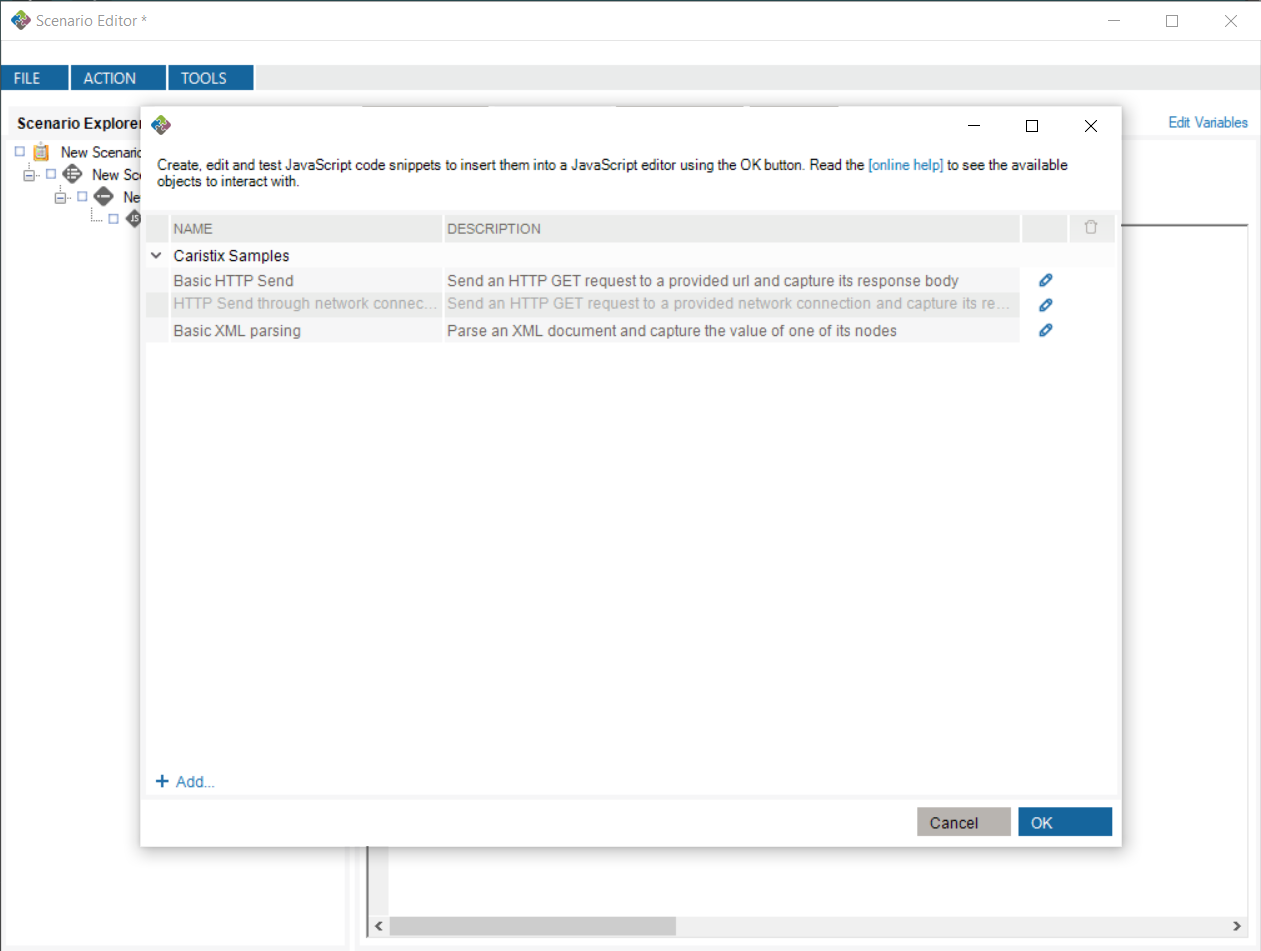
The snippet manager allows you to write, test and save scripts for future use. To access it, go into any textbox in which the JavaScript API can be used, right-click the textbox and select “Insert Code Snippet…”

Menu - Insert Code Snippet

From there, you can select one of the scripts you’ve written, or one of the default Caristix Samples.

Select Code Snippet

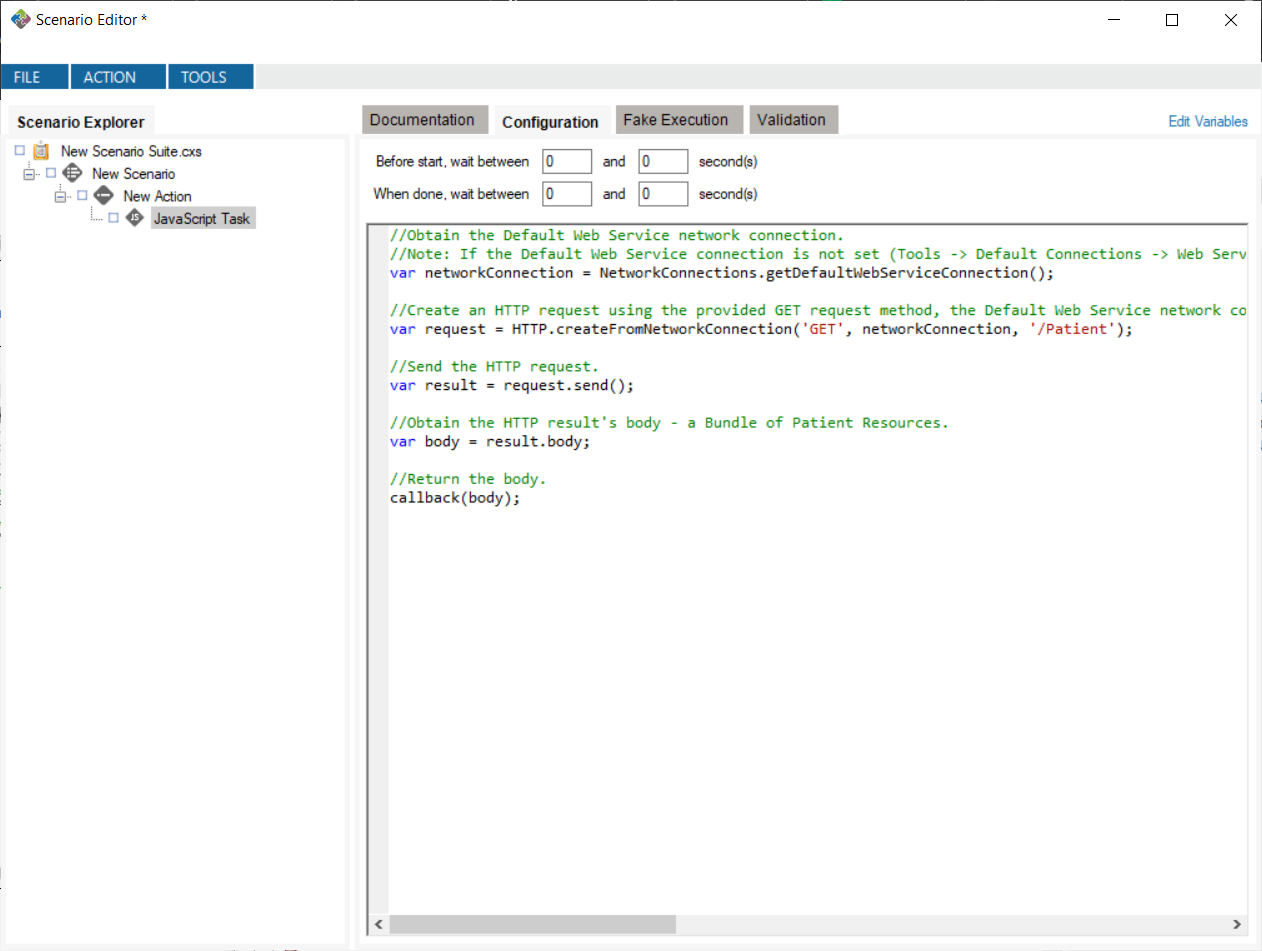
Clicking “OK” after selecting a script inserts that script at the position of the caret in your JavaScript editor.

Inserted Code Snippet

Creating and Editing a Snippet

You can create your own code snippets by clicking the “+ Add…” button. You can edit the snippet by clicking the edit Edit Button button, opening the JavaScript editor window. Once the window is closed, any changes you make will automatically be saved. Note: any changes to Caristix Samples will not be saved.
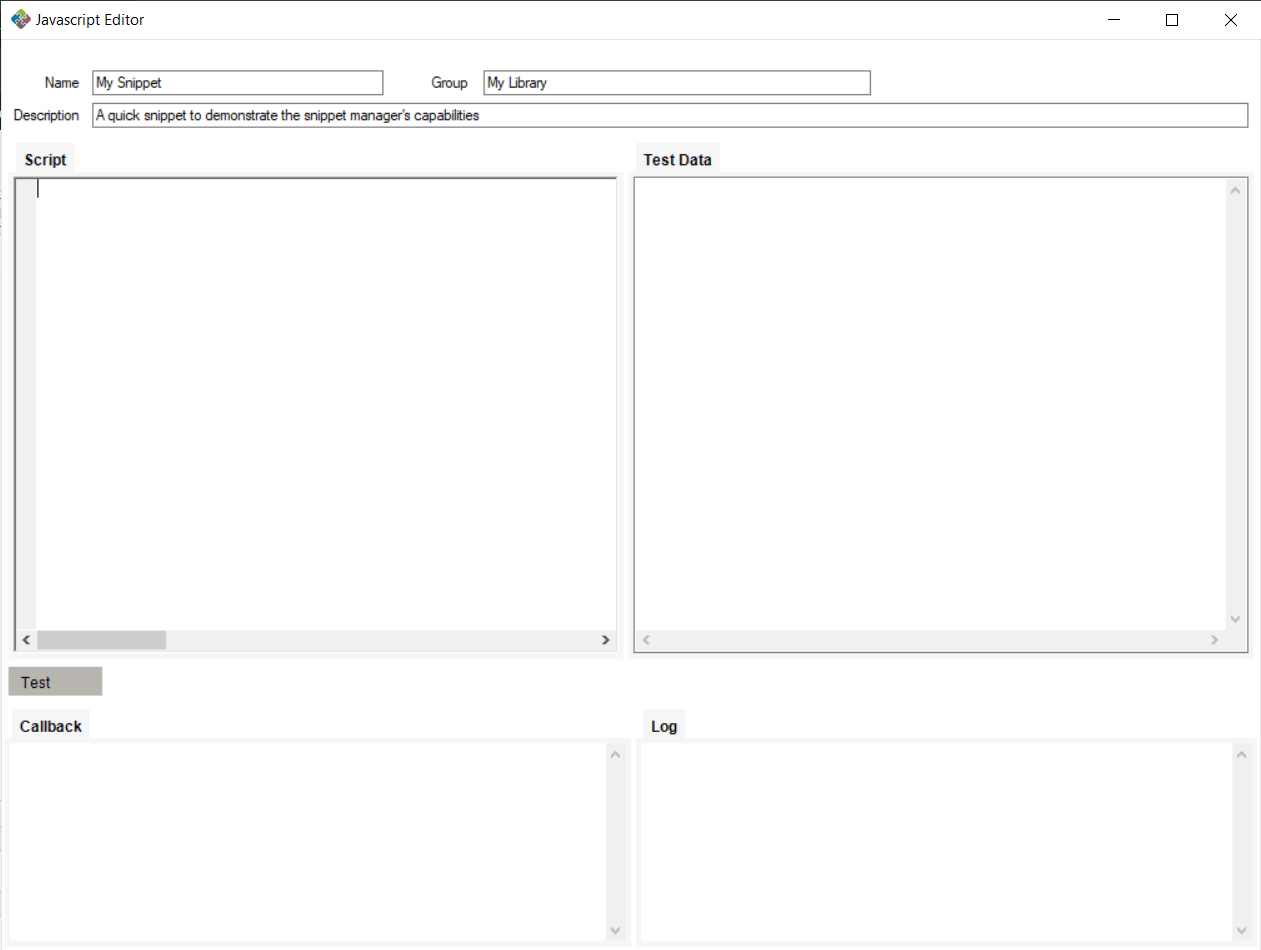
The JavaScript editor window contains fields for editing, naming, describing, grouping and testing your snippets.

Snippet with edited Name, Description and Group

Grouping

Using the same group name for different snippets causes them to be grouped together in the snippet manager.

Snippet Manager With Different Groups

Testing

While writing your snippet, you can test it by feeding it text. Writing data such as HL7 messages in the Test Data field places that in the JavaScript editor’s context as the testData property. This property can be accessed in your snippet while testing. Note: outside of testing snippets, the testData property will always be null.

JavaScript Editor With Test Data

By clicking the “Test” button, you can test using the data you provide in the Test Data field. Callback and log information gets shown in the Callback and Log textboxes.

Tested Snippet

XML Parser

XML Parser JavaScript API

The XML Parser allows you to transform an XML-string into a queryable object, XPathNavigator.

var xmlObj = XML.parse('<xml><element attribute="value1" /><element attribute="value2" /></xml>');

XPathNavigator

This object exposes properties and methods to query an XML element easily using X-Path.
https://www.w3schools.com/xml/xpath_syntax.asp

Properties

value: string

The XML object’s value. If the object is an element, the value is the text inside between start and end tags or the inner XML content if applicable. If the object is an attribute, the value is the attribute’s value.

var firstElement = xmlObj.selectFirst('/xml/element/@attribute');
var value = firstElement.value;
// The value should be equal to "value1".

Methods

selectFirst(x-path: string): XPathNavigator

Returns the first occurrence of the provided X-Path, or undefined if there are no occurrences.

var element = xmlObj.selectFirst('/xml/element');
// Should return the first <element> inside the <xml> node.

select(x-path: string): XPathNavigator

Returns an array with all occurrences of the provided X-Path, or an empty array if no occurrences.

var elements = xmlObj.select('/xml/element');
// Should return an array with all <element> inside the <xml> node.

toString(): string

Returns a string representation of the XML element.

var element = xmlObj.selectFirst('/xml/element');
var value = element.toString()
// The value should be equal to "<element attribute="value1" />".