
The Web ServicePro WDSL is located at http://localhost:[PORT]\CloakService.svc?wsdl where [PORT] is the selected port during the installation (the default value is 8084).
Get the service version.
Returns string.
Call example:
<soap:Envelope xmlns:soap="http://schemas.xmlsoap.org/soap/envelope/"
               xmlns:cx="Caristix.Cloak.WebService.Interface">
     <soap:Body&>
          <cx:GetVersion></cx:GetVersion?>
     </soap:Body>
</soap:Envelope>
Response example:
<s:Envelope xmlns:s="http://schemas.xmlsoap.org/soap/envelope/">
    <s:Body>
        <GetVersionResponse xmlns="Caristix.Cloak.WebService.Interface">
            <GetVersionResult>4.6.0.0</GetVersionResult>
        </GetVersionResponse>
    </s:Body>
</s:Envelope>Get the license information for this instance of the service.
Call example:
<?xml version="1.0" encoding="utf-8"?>
<soap:Envelope xmlns:soap="http://schemas.xmlsoap.org/soap/envelope/">
  <soap:Body/>
</soap:Envelope>
Response example:
<s:Envelope xmlns:s="http://schemas.xmlsoap.org/soap/envelope/">
    <s:Body>
        <GetServerLicenseResponse xmlns="Caristix.Cloak.WebService.Interface">
            <GetServerLicenseResult>
                <ServerLicense MachineName="DESKTOP-012345" Port="8086" Guid="503ac404-ef88-47ea-a0
                             f9-c4a4b0e3321d" Count="0" Key="666J27737866J636068166S20032U67666856U
                             G45909KMI807NQS1I@9O7C64XJ03F9950V16556Q50732593SLQ71508QUU3594R54605T
                             686356264Q896166069V230C" LimitDateTicks="638574624000000000"/>
            </GetServerLicenseResult>
        </GetServerLicenseResponse>
    </s:Body>
</s:Envelope>Set the license information for this instance of the service. This method is used by the Cloak application to configure the Web Service.
Reset all settings to default including default de-idendtification rules.
Clear all data persisting in memory. It also clears all DeIdentificationSettings
Get usage statistics.
Returns: indicates the number of calls received, number of HL7 messages processed, etc.
Call example:
<soap:Envelope xmlns:soap="http://schemas.xmlsoap.org/soap/envelope/">
  <soap:Body/>
</soap:Envelope>
Response example:
<s:Envelope xmlns:s="http://schemas.xmlsoap.org/soap/envelope/">
    <s:Body>
        <GetStatisticsResponse xmlns="Caristix.Cloak.WebService.Interface">
            <GetStatisticsResult NbCalls="0" NbMessageReceived="0" NbMessageError="0" NbDistinctIds="0" StartTime="28/07/2023 8:19:42 AM"/>
        </GetStatisticsResponse>
    </s:Body>
</s:Envelope>Get De-identification rules currently in use. Returns DeIdentificationRules (an XML structure). Call example:
<soap:Envelope xmlns:soap="http://schemas.xmlsoap.org/soap/envelope/">
  <soap:Body/>
</soap:Envelope>
Response example (partial):
<s:Envelope xmlns:s="http://schemas.xmlsoap.org/soap/envelope/">
    <s:Body>
        <GetDeIdentificationRulesResponse xmlns="Caristix.Cloak.WebService.Interface">
            <GetDeIdentificationRulesResult Version="4.6">
                <DeIdentificationField Enabled="True" Name="DeId-1" Segment="PID" Field="3"
                          Component="1" SubComponent="-1" IsId="True">
                    <Generator Version="4.2" Id="DeId-1_Generator" Name=""
                              Format="" ValueType="String">
                        <Variable Version="4.2" Id="DeId-1_Variable-1" Type="String"
                                      AllowNull="False" LimitationMin="9" LimitationMax="9"
                                      IncludeLowercaseLetter="False" IncludeUppercaseLetter="False"
                                      IncludeDigit="True" IncludeSpecialCharacter="False"/>
                    </Generator>
                </DeIdentificationField>
             ...
Set De-Identification rules to use. This method is used by the Cloak application to configure the Web Service. Parameters: DeIdentificationRules deIdentificationRules (an XML structure). Call example:
<soap:Envelope xmlns:soap="http://schemas.xmlsoap.org/soap/envelope/">
  <soap:Body/>
</soap:Envelope>
Response example:
<s:Envelope xmlns:s="http://schemas.xmlsoap.org/soap/envelope/">
    <s:Body>
        <SetDeIdentificationRulesResponse xmlns="Caristix.Cloak.WebService.Interface"/>
    </s:Body>
</s:Envelope>Get Reference Specification Definition currently in use.
Returns SpecificationPackage (an XML containing a stream of a cxp file).
Call example:
<?xml version="1.0" encoding="utf-8"?>
<soap:Envelope xmlns:soap="http://schemas.xmlsoap.org/soap/envelope/">
  <soap:Body/>
</soap:Envelope>
Response example:
<s:Envelope xmlns:s="http://schemas.xmlsoap.org/soap/envelope/">
    <s:Body>
        <GetReferenceSpecificationDefinitionResponse xmlns="Caristix.Cloak.WebService.Interface">
            <GetReferenceSpecificationDefinitionResult>
                <Stream Length="570803">UEsDBBQAAgAIAAhF/FYu/si2SQAAAFoAAAAPABwAcGFja2FnZUluZm8ueG1
                            sIKIYACigFAAAAAAAAAAAAAAAAAAAAAAAAAAAALOxr8jNUShLLSrOzM+zVTLUM1Cyt+Pls
                            glITM5OTE/1zEvLV4CyQyoLUm2VggtSkzPTMpMTS4AaXFLTMvMyQSwlhTBkMxT07QBQSwME
                            FAACAAgACEX8Vu5V5sytSgQAMGgdABsAHABzcGVjaWZpY2F0aW9uRGVmaW5pdGlvbi54bWw
                            gohgAKKAUAAAAAAAAAAAAAAAAAAAAAAAAAAAA7L3rcttKtib4fyLmHRB7Ik5JJyjZlOTL3n
                            WqO2hJttlbomSScl0mph0gmZJQBgEWLpJ1ftU79K+OmHmDfop+lHqSWZfMRAJIgCApWZKNi
...Set Reference SpecificationDefinition to use. This method is used by the Cloak application to configure the WebService.
Parameters: SpecificationPackage specificationPackage: (an XML containing a stream of a cxp file).
Call example:
<?xml version="1.0" encoding="utf-8"?>
<soap:Envelope xmlns:soap="http://schemas.xmlsoap.org/soap/envelope/">
  <soap:Body/>
</soap:Envelope>
Response example:
<s:Envelope xmlns:s="http://schemas.xmlsoap.org/soap/envelope/">
    <s:Body>
        <SetReferenceSpecificationDefinitionResponse xmlns="Caristix.Cloak.WebService.Interface"/>
    </s:Body>
</s:Envelope>De-identify the given HL7 v2 message(s) in ER7 format (‘I’ delimited).
Call example:
<?xml version="1.0" encoding="utf-8"?>
<soap:Envelope xmlns:soap="http://schemas.xmlsoap.org/soap/envelope/" xmlns:cx="Caristix.Cloak.
WebService.Interface">
<soap:Body>
<cx:ProcessMessageER7><cx:message>MSH|^~\&|SPC|R|ENG|R|200609280100|42|ADT^A03|44859642|D
|2.2|44859642||AL||
EVN|A03|200609280100||
PID||717218198|9473^^^R|794429082^R17240|Outreach^Carlene^^||19130113000000|F||3|912 Headden
Rdg^^Debord^KY^41214^US^C^|25|||ENGLISH^E^|W|^|339679095^^^R|894-181-1608|
PV1||O|^^^R^^^|3|||180823600^Rasmussen^Gwendolyn^^^^MD|103430737^Kelley^Lionel^^^^MD||LAB||||1|
978429584^Larson^Lynne^^^^MD|LNR^^R|916880876^^^R|Z||||||||||||||||A11|||R|||||20060926023900|
20060930145900||||
NTE|1|Demographics: Carlene Outreach 01/13/1913 |
NTE|2|ID: 0001754423 |
NTE|3|Patient anxious |
ZCA|||^^^
ZCD||N|||^^||||||||||||||||||||||||||||||||||||||||||||||||||||||||||||||||||||^SURGERY CASE NUMBER~^EMSTAT NUMBER
ZCV|||||||LNR|0</cx:message></cx:ProcessMessageER7>
</soap:Body>
</soap:Envelope>
Response example:
<s:Envelope xmlns:s="http://schemas.xmlsoap.org/soap/envelope/">
<s:Body>
<ProcessMessageER7Response xmlns="Caristix.Cloak.WebService.Interface">
<ProcessMessageER7Result>MSH|^~\&|SPC|R|ENG|R|200609280100|42|ADT^A03|44859642|D
|2.2|44859642||AL||
EVN|A03|200609280100||
PID||810673586|102551581^^^R|142273301^R17240|Velazquez^Sherry^^||19130615000000|F||3|931^^
Whitehall^NY^12887^US^C^|25|||ENGLISH^E^|W|^|204112749^^^R|554-332-0570|
PV1||O|^^^R^^^|3|||903742461^Reilly^Myrna^^^^MD|949575804^Mcmahon^Lanny^^^^MD||LAB||||1|||
299029782^Pope^Emily^^^^MD|LNR^^R|736473459^^^R|Z||||||||||||||||A11|||R|||||2006092319
3900|20061006015900||||
NTE|1|Demographics: Sherry Velazquez 06/15/1913 |
NTE|2|ID: 102551581 |
NTE|3|Patient anxious |
ZCA|||^^^
ZCD||N|||^^||||||||||||||||||||||||||||||||||||||||||||||||||||||||||||||||||||^SURGERY CASE
NUMBER~^EMSTAT NUMBER
ZCV|||||||LNR|0

</ProcessMessageER7Result>
</ProcessMessageER7Response>
</s:Body>
</s:Envelope>Set delimiters for the HL7 Message Reader. This method is used by the Cloak application to configure the Web Service. Parameters: String messageBeginningDelimiter: a regex to specify if HL7 messages start with special delimiters. String messageEndingDelimiter: a regex to specify if HL7 messages end with special delimiters. String segmentEndingDelimiter: a regex to specify if HL7 segments end with special delimiters.
De-identify the given XML message(s). Any data can be provided as long as it is a valid XML document, including CCD, FHIR-XML or any other XML document.
Parameters: XmlElement message: one or more HL7 messages in XML format.
Returns XmlElement.
Equivalent to DeIdentifyXML
De-identify the given HL7 v2 message(s) in XML format. Call
<ADT_A03 xmlns="urn:hl7-org:v2xml"> <MSH> <MSH.1>|</MSH.1> <MSH.2>^~\&</MSH.2> <MSH.3>SPC</MSH.3> <MSH.4>R</MSH.4> ...
Deprecated. See GetHL7DeIdentificationSettings
Deprecated. See SetHL7DeIdentificationRules
Deprecated. See GetHL7ReferenceSpecificationDefinition
Deprecated. See SetHL7ReferenceSpecificationDefinition
Deprecated. See DeIdentifyHL7
Deprecated. See DeIdentifyHL7_Xml
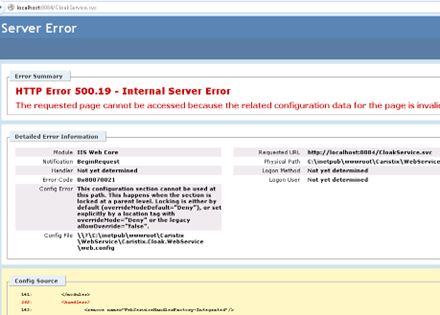
After installing Caristix Cloak Web Service, if the service returns an Internal Server Error or a Forbidden error, this means ASP.Net or ServiceModel aren’t probably installed for IIS.

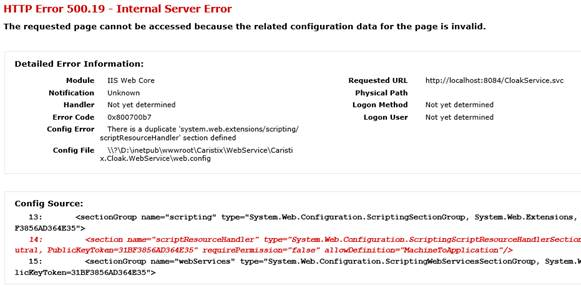
There is also another possibility when the service returns an Internal Server Error, if it says that There is a duplicate ‘system.web.extensions/scripting/scriptResourceHandler’ section defined.
In this case, simply comment the line 14 of the webconfig file located in C:\inetpub\wwwroot\Caristix\WebService\Caristix.Cloak.WebService by typing <!– at the beginning and –> at the end. Here is a link for more detail.
If the service is available from the local computer, but not from another one, this is probably due to a firewall restriction. Add a new rule to your firewall to include the port that the Cloak Web Service is using (default: 8084).